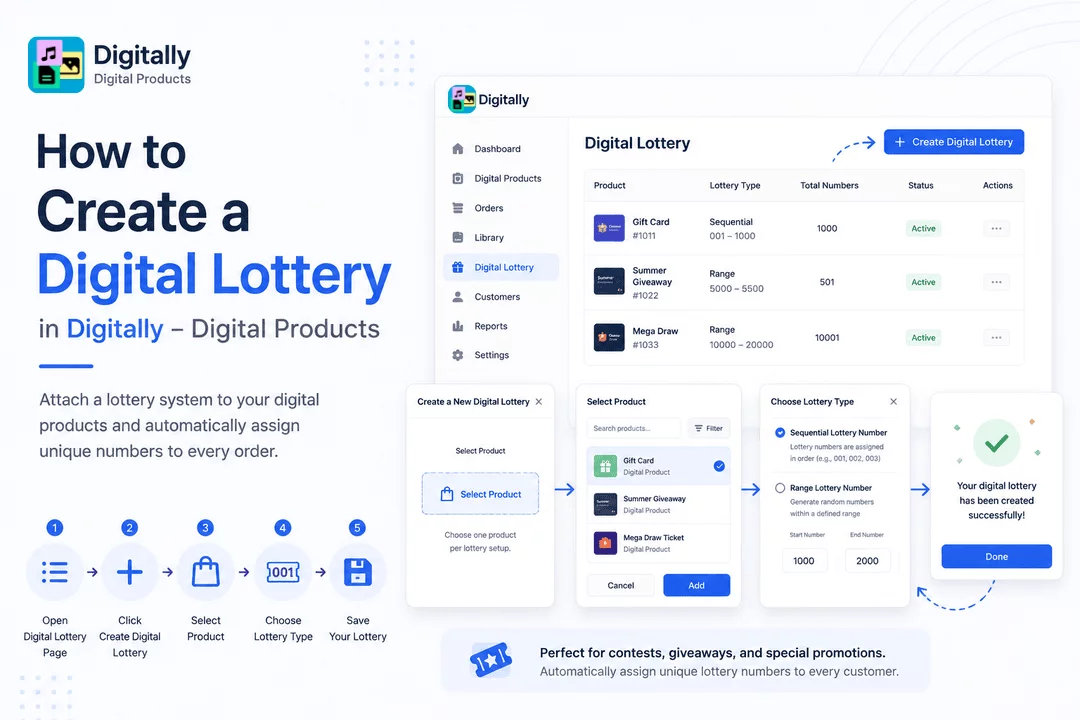
Creating a digital lottery is quick and simple with the Digitally – Digital Products app. Just follow these steps to attach a lottery system to any of your digital products.
✅ Step 1: Open the Digital Lottery Page
From your Shopify dashboard, launch the Digitally – Digital Products app.
In the left-hand menu, click on "Digital Lottery" to access the lottery management page.

➕ Step 2: Click “Create Digital Lottery”
On the Digital Lottery page, find the "Create Digital Lottery" button at the top-right corner and click it to begin.

🛍️ Step 3: Select the Product
A pop-up will appear titled “Create a New Digital Lottery.”
Click on the "Select Product" button.

This opens a new modal where you can:
- Search for your product by name
- Filter products to narrow down results
- Choose one product per lottery setup
Once you’ve selected the product, click “Add” to continue.

🔢 Step 4: Choose Your Lottery Type
After selecting the product, choose the type of lottery you want to assign:
- Sequential Lottery Number: Lottery numbers are assigned in order (e.g., 001, 002, 003)

- Range Lottery Number: You’ll need to define two values:
- Start Number – the beginning of your lottery range
- End Number – the end of the range
The app will randomly generate a unique number within this range for each order.

💾 Step 5: Save Your Digital Lottery
Once your product and lottery type are selected, click the “Save” button.
Your digital lottery is now linked to the selected product and ready to go!

🎉 That’s It!
You’ve successfully created a digital lottery in the Digitally – Digital Products app. Whether you're using it for contests, giveaways, or special promotions, your lottery is now live and ready to assign unique numbers to customers automatically.
Need help editing a lottery later? Check out our guide: [How to Edit Digital Lottery in Digitally – Digital Products]



