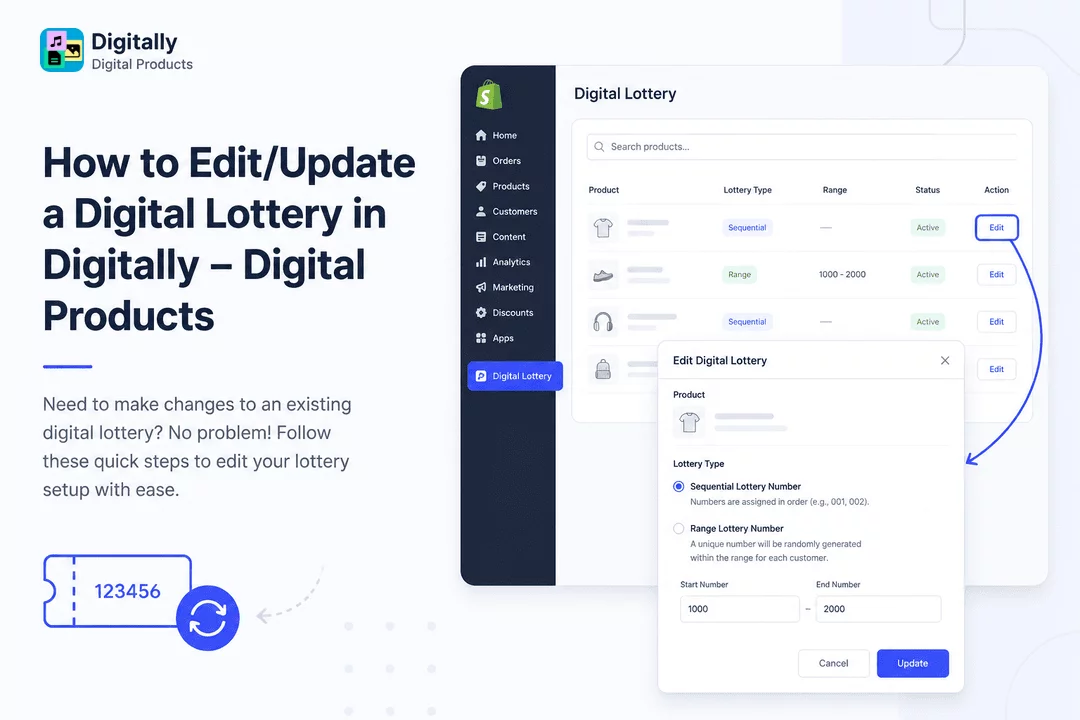
Need to make changes to an existing digital lottery? No problem! Follow these quick steps to edit your lottery setup with ease.
✅ Step 1: Open the Digital Lottery Page
Start by launching the Digitally – Digital Products app from your Shopify dashboard.
From the menu, click on “Digital Lottery” to open the lottery management section.

🔍 Step 2: Find the Product You Want to Edit
On the Digital Lottery page, you’ll see a list of all products that have a digital lottery assigned.
Use the search bar to find the specific product you want to update.

✏️ Step 3: Click the “Edit” Button
Once you've found the right product, click the “Edit” button next to it.
A modal window will pop up, showing the current lottery settings.

🔄 Step 4: Update the Lottery Type
You’ll see the product already selected. Now choose the new lottery type you want to assign:
- Sequential Lottery Number – Numbers are assigned in order (e.g., 001, 002).

- Range Lottery Number – Enter a:
- Start Number – The beginning of the number range.
- End Number – The last possible number in the range.
A unique number will be randomly generated within this range for each customer.

💾 Step 5: Save Your Changes
After updating the lottery type and settings, click the “Update” button to save your changes.
Your digital lottery has now been successfully edited!

🎉 That’s It!
You’ve now edited a digital lottery in the Digitally – Digital Products app. Whether you're switching number types or adjusting ranges, the update process is fast and flexible.



