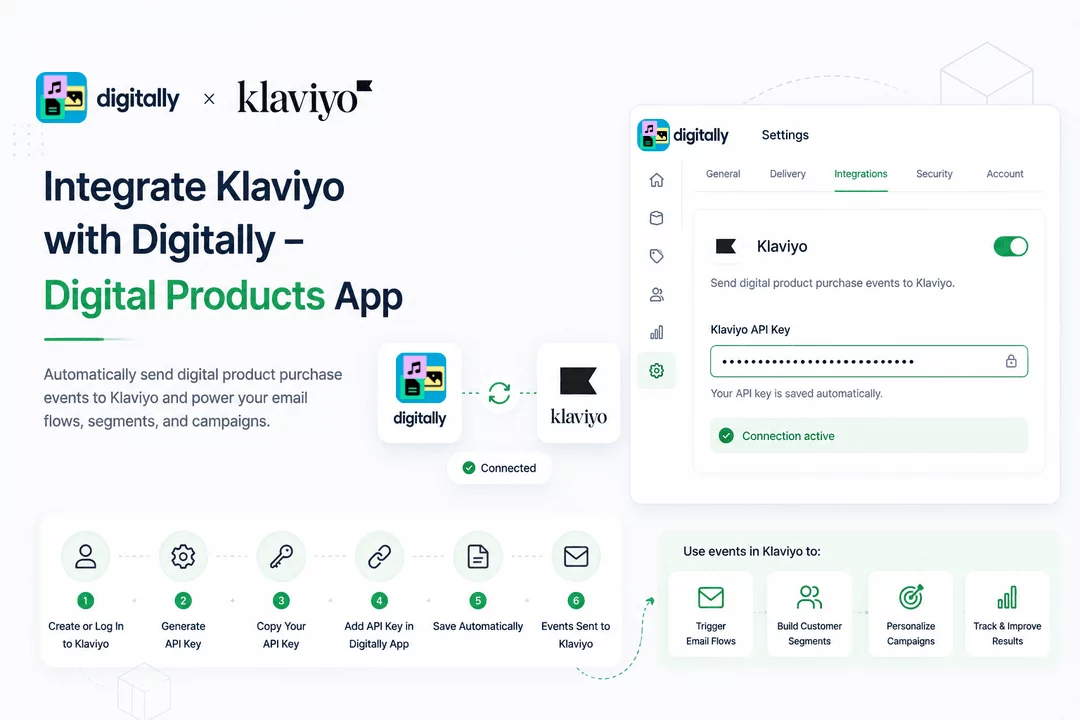
Connect your Klaviyo account to Digitally – Digital Products to automatically send digital product purchase events from your Shopify store to Klaviyo. Once connected, these events can be used to build customer segments, trigger automated email flows, and personalize marketing campaigns.
✅ Step 1: Create or Log In to Your Klaviyo Account
If you don't already have a Klaviyo account, create one and sign in. Click here

⚙️ Step 2: Open Your Account Settings
In the bottom-left corner of the Klaviyo dashboard:
- Click your account name.
- Select Settings.

🔑 Step 3: Navigate to API Keys
On the Settings page:
- Search for API Keys, or
- Select API Keys from the available settings menu.

➕ Step 4: Create a Private API Key
Under the Private API Keys section, click Create Private API Key.

📝 Step 5: Give Your API Key a Name
Enter a descriptive name for your API key, such as:
- Digitally App
- Shopify Digital Products
- Digitally Integration

🔒 Step 6: Grant the Required Permissions
Set the API key permissions to Full Access.

This allows the Digitally – Digital Products app to securely send purchase events to your Klaviyo account so they appear in your customer profiles and can be used in segments and automations.
✅ Step 7: Create the API Key
Click Create in the top-right corner of the page.

📋 Step 8: Copy Your API Key
After the API key is created, Klaviyo will display it only once.

⚠️ Important: Copy and securely save your API key immediately. For security reasons, Klaviyo will not display the key again after you leave the page.
🛍️ Step 9: Add the API Key to the Digitally App
- Open your Shopify Admin.
- Launch Digitally – Digital Products.

- Go to Settings.
- Select Integrations.

- Navigate to the Klaviyo section and enable the Klaviyo card.
- Paste your copied API key into the Klaviyo API Key field.

💾 Step 10: Save Your API Key
Click anywhere outside the API key field.
✅ Your API key will be saved automatically.

Now that the connection has been established successfully. The "Digitally Order Delivered" event data will now be automatically sent to your Klaviyo account.
🎉 You're All Set!
Your Digitally – Digital Products app is now connected to Klaviyo.
From now on, whenever a customer purchases a digital product from your Shopify store, Digitally will automatically send the purchase event to Klaviyo.
These events are associated with the customer's email address and appear in their Klaviyo profile, allowing you to:
- ✉️ Trigger automated email flows
- 👥 Build customer segments
- 🎯 Create personalized marketing campaigns
- 📊 Track customer purchase activity
- 🚀 Improve customer engagement and retention



