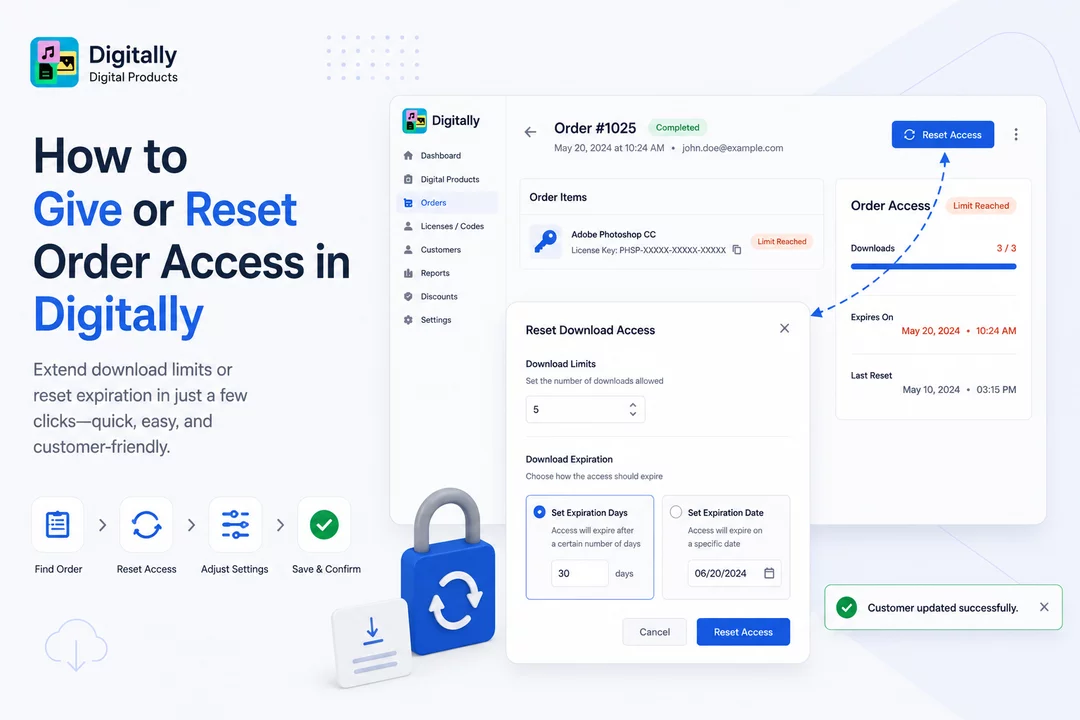
Need to extend download limits or reset expiration for a customer’s order? Follow these simple steps to reset digital access in the Digitally – Digital Products app.
✅ Step 1: Open the Orders Page
Go to the Digitally – Digital Products app from your Shopify admin.
Navigate to the Orders page where all digital product orders are listed.

✅ Step 2: Locate the Digital Order
Only orders that include digital products will appear in this list.
Find the order for which you need to reset access.

✅ Step 3: Search for the Order
Use the search bar at the top to locate the order using:
- Order number
- Customer’s first name
- Product name
Click the order number to open the detailed Single Order Page.


✅ Step 4: Click “Reset Access”
On the order page:
- Look at the top-right corner for the Reset Access button.
- This button will only appear if the download limit has been reached or the expiration date has passed.
You’ll also see the Order Access Card on the right, which displays the current download status and limits.

✅ Step 5: Adjust Access Settings
Clicking Reset Access will open a Reset Download Access modal.

In this modal, you can update two main areas:
🔢 Download Limits
Set the number of downloads the customer is allowed.
(Useful if you originally set a limit when creating the digital product.)

📅 Download Expiration
Choose one of the following:
- Set the number of expiration days

- Or pick a specific expiration date

Adjust these based on customer requests or your policy.
✅ Step 6: Save Your Changes
Click the Reset Access button in the modal to save.
A confirmation toast will appear: “Customer updated successfully.”


The Order Access Card will now reflect the updated access information, including the date and time the reset was applied.

🎉 Done!
Your customer now has renewed access to download their digital product. It’s quick and easy with Digitally – Digital Products!



