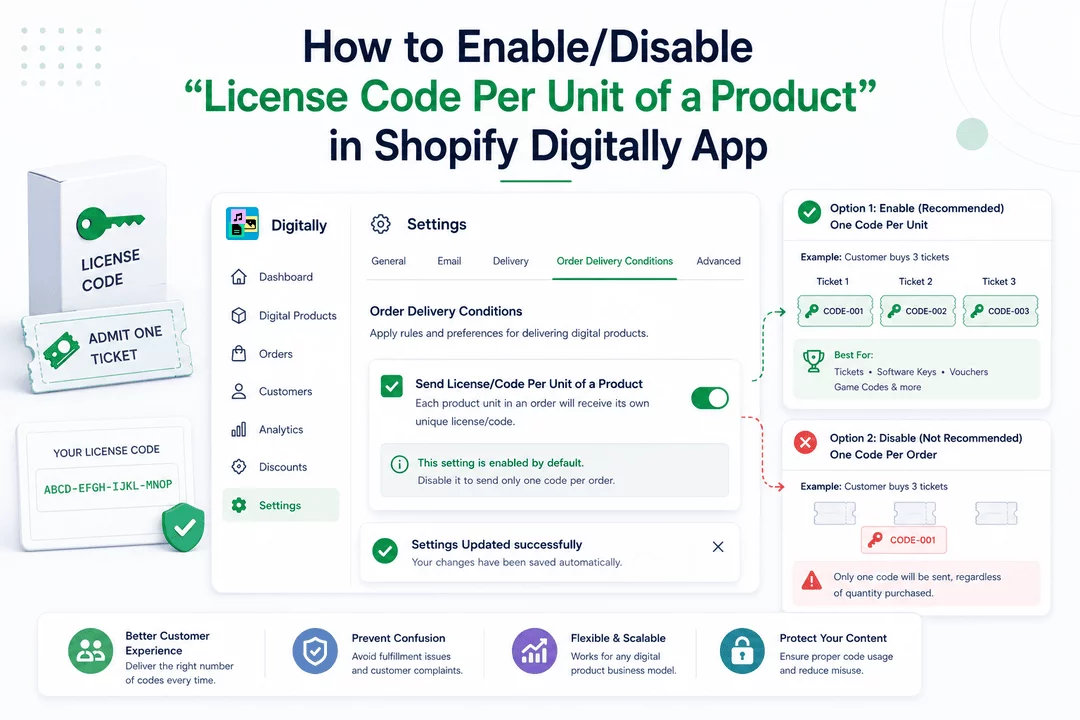
Selling license keys, tickets, or access codes? This setting controls how many unique codes your customer receives per purchase. Enable it to assign one code per unit, or disable it to assign one code per order—depending on your business model.
Here’s how to configure this option inside the Digitally – Digital Products app.
⚙️ Step 1: Open the App Settings
- From your Shopify Admin, open the Digitally – Digital Products app.
- In the app, go to the Settings tab using the left-hand sidebar or top navigation bar.

💡 Pro Tip: This is your central hub for managing how digital products are delivered, including license code behavior and order-based rules.
🔍 Step 2: Find the License Code Delivery Setting
- Scroll down to the section titled Order Delivery Conditions.
- Look for the checkbox labeled:
- “Send License/Code Per Unit of a Product”

✅ Step 3: Choose How You Want to Deliver License Codes
Option 1: Enable (Recommended) – One Code Per Unit
- ✅ Leave the checkbox checked (this is the default).
- Each product unit in an order will receive its own unique license/code.
Example:
A customer buys 3 tickets → they get 3 separate codes (one per ticket).
🎯 Best For:
- Concert/event tickets
- Software license keys
- Gift vouchers
- Game activation codes
Any digital product requiring individual code usage per item
💡 Pro Tip: This method ensures that bulk purchases are handled correctly and codes can be distributed per recipient (e.g., gifting multiple tickets).
- Option 2: Disable – One Code Per Order
- ❌ Uncheck the box.
- The customer will receive only one code—no matter how many units they purchase.
Example:
A customer buys 3 tickets → they only get 1 code.
⚠️ Warning: This is not recommended for most merchants unless you have a specific use case, such as:
- Sending a single access key for group use
- Offering unlimited access tied to one code
📌 Note: Disabling this can lead to confusion and fulfillment issues—especially if customers expect individual codes for each item.
📌 Important Notes:
- ✅ This setting is enabled by default in the Digitally app.
- You only need to disable it if your digital product or fulfillment model specifically requires one code per order.
- This setting applies globally to all digital products using license codes in your store.
💾 Step 4: Saving Changes (It’s Instant!)
Good news—no need to click a "Save" button!
Once you check or uncheck the Send License/Code Per Unit box, the app automatically saves your selection.
You’ll see a confirmation toast message like this:
“Settings Updated successfully”

💡 Pro Tip: Want to test it? Place a test order with multiple quantities to confirm how license codes are issued.
🎉 You’re All Set!
Now you know how to control license/code delivery per unit or per order. Adjust it to fit your fulfillment flow, protect your content, and create a seamless digital product experience.



