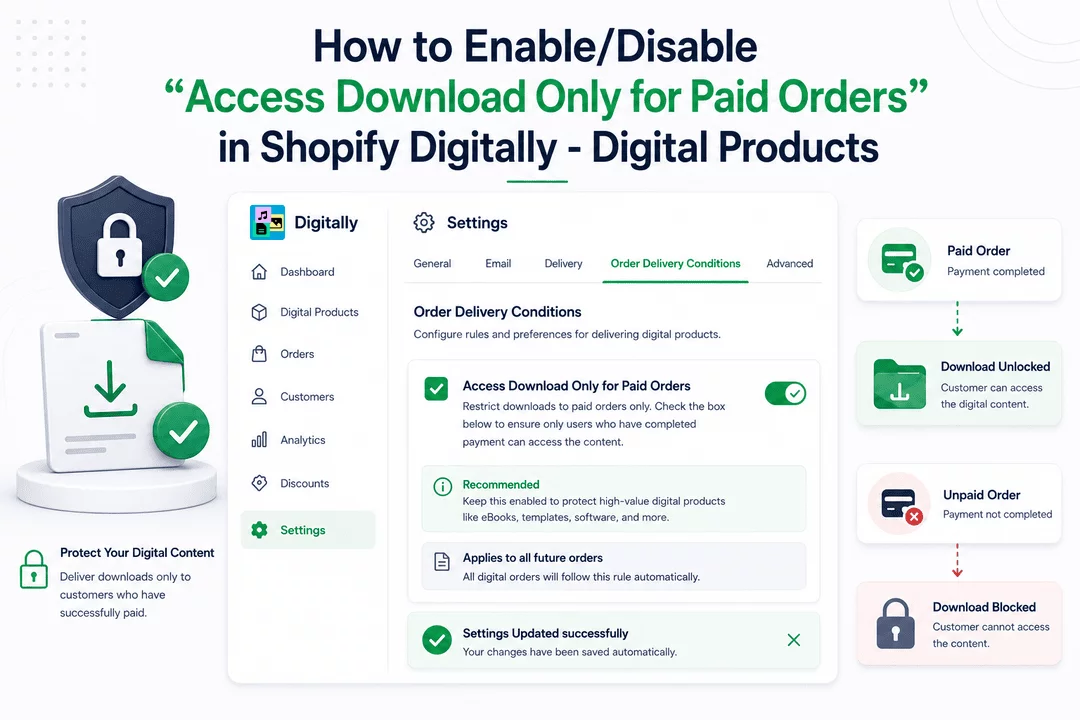
Want to make sure customers only get access to digital downloads after payment is completed? This setting helps you protect your content and ensures you only deliver files to verified, paid customers.
Follow these steps to activate this feature in your Digitally - Digital Products app.
⚙️ Step 1: Open the App Settings
- From your Shopify admin, open the Digitally – Digital Products app.
- Navigate to the Settings page by selecting Settings from the left-side menu.

💡 Pro Tip: You can manage multiple delivery conditions here—ideal if you’re handling various product types or fulfillment flows.
🔍 Step 2: Locate the Delivery Condition Setting
- Scroll down to the Order Delivery Conditions section.
- Look for the option labeled Access Download Only for Paid Orders.

📌 What This Does:
“Restrict downloads to paid orders only. Check the box below to ensure only users who have completed payment can access the content.”
✅ Step 3: Enable or Disable the Setting
- To restrict downloads to only paid orders:
- Check the box next to Access Download Only for Paid Orders.
- To allow downloads even before payment (e.g., for Cash on Delivery or Manual Payment methods):
- Leave the box unchecked.
⚠️ Important Note:
This setting is disabled by default in the Digitally app. If you don’t want unpaid users to access downloads, you must enable it manually as shown above.
💡 Pro Tip: If you're selling high-value digital products like eBooks, templates, or software, keeping this enabled is highly recommended to prevent unpaid downloads.
💾 Step 4: Saving Changes (It’s Automatic!)
✅ No need to press a Save button—our app automatically applies your change the moment you check or uncheck the box.
You’ll see a quick confirmation message (a toast notification) saying:
“Settings Updated successfully”
📌 What This Means for Orders:
- All future digital orders will follow this rule automatically.
- There’s no need to adjust this setting for individual products.

🎉 Done!
You’ve successfully set up download access based on order payment status. Your digital content is now protected and will only be delivered to paying customers—just the way it should be.



