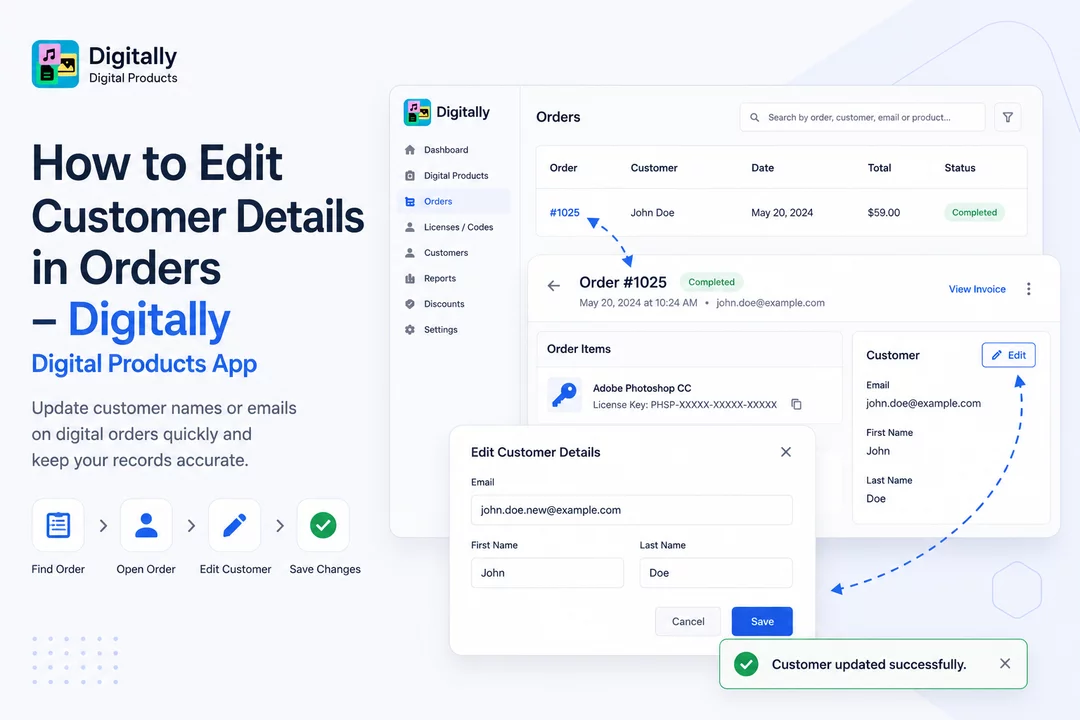
Need to correct a customer’s name or email on a digital order? Follow these quick steps to update customer details directly in the Digitally – Digital Products app.
✅ Step 1: Open the Orders Page
Log in to your Shopify store and open the Digitally – Digital Products app.
Head over to the Orders page to see all orders containing digital products.

✅ Step 2: Find the Digital Order
Only orders with digital products are shown in this list.
Look for the specific order you want to update.

✅ Step 3: Search for the Order
Use the search bar at the top of the page to find the order by:
- Order number
- Customer’s first name
- Product name
Click on the order number to open the order details.


✅ Step 4: Locate the Customer Card
On the Single Order Page, scroll to the bottom right side.
You’ll find the Customer Card with the customer’s current information.
Click the Edit button on this card to make changes.


✅ Step 5: Edit Customer Information
A modal will appear where you can update:
- Customer Email
- First Name
- Last Name

✅ Step 6: Save Your Changes
Once you're done editing, click the Save button.
You’ll see a confirmation toast: “Customer updated successfully.”


Your changes will now be reflected in the order.
🎉 Done!
You’ve successfully updated the customer details for the order — quick, easy, and efficient with Digitally – Digital Products.



