How to Centralize Digital Product Delivery and Management
Managing digital products can seem simple when you have only a few products. Upload a file, send it to the customer, and move on.
But as your Shopify store grows, digital product management can quickly become complicated.
You may be selling ebooks, PDFs, software licenses, activation keys, courses, templates, membership access, downloadable files, or custom links. Managing each product manually can lead to missed deliveries, outdated files, duplicate work, and unnecessary customer support requests.
The solution is to centralize digital product delivery and management.
Instead of using separate tools and manual processes for storing products, managing access, delivering files, and tracking downloads, you can manage everything from one centralized system.
In this guide, we'll explain what centralized digital product management means, why it matters, how to set it up on Shopify, and how Digitally – Digital Products can help automate the entire process.
What Is Centralized Digital Product Delivery?
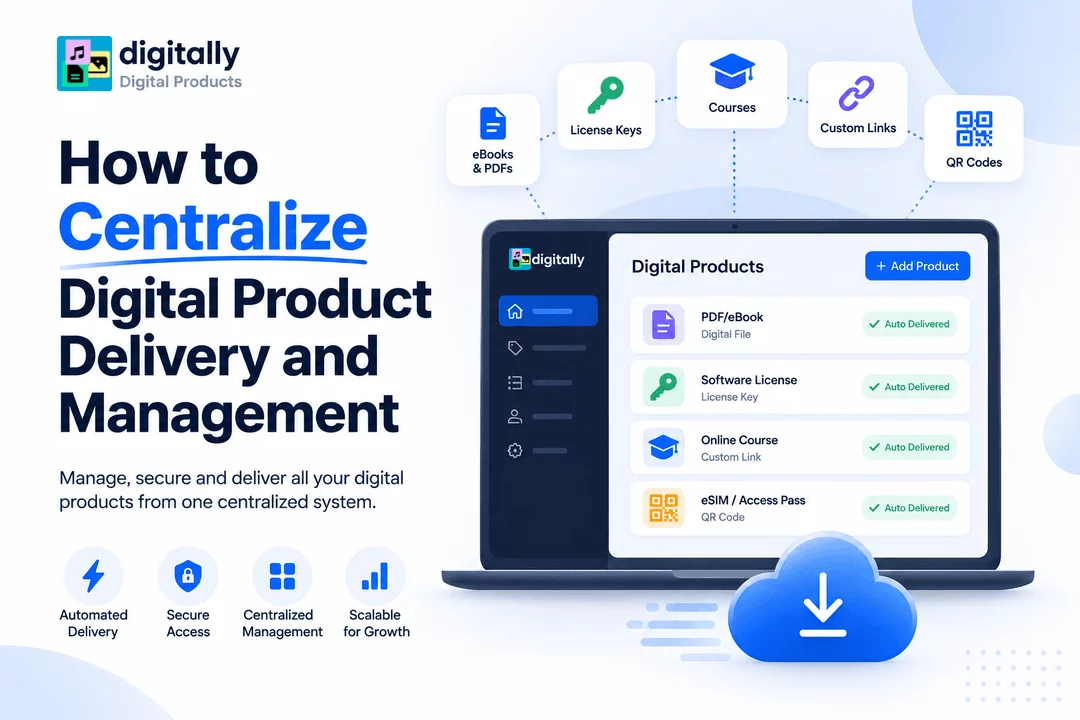
Centralized digital product delivery means managing your digital products, delivery methods, customer access, and product files from one system.
Rather than manually handling different types of digital products through separate platforms, you can create a single workflow.
For example:
Customer places an order → Payment is confirmed → Digital product is automatically delivered → Customer receives secure access → Download or access is managed automatically.
A centralized system can manage different digital products, including:
- eBooks and PDFs
- Software licenses
- Activation keys
- Game keys
- Subscription keys
- Online courses
- Templates
- Digital artwork
- Music and audio files
- ZIP files
- Custom download links
- QR codes
- Membership access
This creates a more organized experience for both the merchant and the customer.
Why Centralize Digital Product Management?
As your catalog grows, managing digital products manually becomes increasingly difficult.
Centralization helps solve several common ecommerce problems.
1. Reduce Manual Work
Without automation, merchants may need to:
- Send files manually
- Email license keys
- Update customer access
- Track which keys have been used
- Respond to download requests
- Replace expired links
- Monitor product inventory
Automation eliminates much of this repetitive work.
Once your products and delivery rules are configured, orders can be processed automatically.
2. Deliver Products Faster
Customers purchasing digital products generally expect immediate access.
Unlike physical products, there is no reason to wait for shipping.
A centralized delivery system can automatically provide the purchased product immediately after checkout.
This can improve the customer experience and reduce questions such as:
"Where is my download?"
"When will I receive my license key?"
"How do I access my purchase?"
3. Manage Multiple Product Types
One of the biggest advantages of centralization is being able to manage different digital products from the same platform.
For example, a Shopify merchant could sell:
Product Type | Delivery Method |
eBook | Secure download |
Software | License key |
Course | Access link |
Subscription | Activation code |
Digital artwork | File download |
GPS guide | PDF or custom link |
Membership | Access credentials |
eSIM | QR code |
Instead of creating separate delivery workflows for every product type, a centralized system can handle them within one ecommerce environment.
The Challenges of Managing Digital Products Without Centralization
Before building a centralized workflow, it's useful to understand what happens when digital product management is fragmented.
Scattered Product Files
Your files may be stored in multiple cloud storage services, computers, email accounts, or other platforms.
This makes it difficult to determine which version is the latest.
Manual License Key Management
If you sell activation codes or license keys, manually sending individual keys can become time-consuming.
It also increases the possibility of sending the wrong key or accidentally sending the same key twice.
Multiple Delivery Platforms
Using one service for files, another for license keys, and another for customer emails creates unnecessary complexity.
Your store becomes dependent on multiple systems.
Limited Security
Public download links can easily be shared.
If a digital product is valuable, unrestricted access can lead to unauthorized distribution.
Growing Customer Support
Every manual step creates another opportunity for something to go wrong.
As order volume increases, even a small delivery problem can generate a significant number of support requests.
What Should a Centralized Digital Product System Include?
A good centralized system should do more than simply store files.
It should support the entire digital product lifecycle.
Here are some important capabilities to consider.
1. Centralized Product Management
Your digital products should be connected directly to your Shopify products.
This allows you to manage product delivery without maintaining separate order-processing workflows.
A centralized system should make it easy to:
- Add digital products
- Upload files
- Connect products
- Update files
- Configure delivery
- Manage customer access
2. Automated Delivery
Automation should be at the center of your digital delivery workflow.
After a successful purchase, the system should automatically determine what the customer purchased and provide the appropriate digital product.
For example:
Order completed → Product identified → Delivery triggered → Customer receives access
This removes the need for manual fulfillment.
3. License Key Management
If your store sells software licenses, game keys, activation codes, or subscriptions, centralized key management is especially important.
Instead of manually assigning keys to customers, you can maintain a key inventory and automatically deliver an available key when an order is completed.
You can also organize keys based on products and track inventory more efficiently.
For businesses managing hundreds or thousands of codes, this can save significant time.
4. Secure File Delivery
Digital products should not simply be exposed through permanent public URLs.
A centralized system should provide controlled access to downloadable files.
Depending on your requirements, security features can include:
- Download limits
- Expiring links
- Protected download pages
- PDF stamping
- Access controls
- Fraud protection
These features can help reduce unauthorized sharing and protect your digital products.
5. Multiple Delivery Channels
Customers should have convenient ways to access their purchases.
A centralized digital delivery system can provide access through multiple channels, such as:
- Order confirmation emails
- Thank You pages
- Customer account areas
- Secure download pages
Giving customers multiple access points can make the purchasing experience smoother.
How to Centralize Digital Product Delivery on Shopify
If you're using Shopify, the process can be straightforward with the right digital product management solution.
Step 1: Identify Your Digital Products
Start by creating a list of everything you sell digitally.
For example:
- PDFs
- eBooks
- Software
- License keys
- Courses
- Templates
- Audio files
- Digital art
- Memberships
- Custom links
Knowing what you're delivering will help you create appropriate workflows.
Step 2: Organize Your Digital Assets
Create a structured system for your digital files and product data.
Use clear names and organize files according to the products they belong to.
For license keys, maintain separate inventories for each product.
For example:
Antivirus Product → Antivirus Keys
Software Product → Software Keys
Game Product → Game Codes
This makes inventory management easier as your catalog grows.
Step 3: Connect Digital Products to Shopify
Your digital delivery system should connect your Shopify products with their corresponding digital assets.
Once connected, the system knows what to deliver when a customer purchases a particular product.
Step 4: Configure Delivery Rules
Determine how each product should be delivered.
For example:
PDF → Download link
License key → Automatically assigned activation key
Course → Access link
eSIM → QR code
Membership → Access information
This allows different product types to use the most appropriate delivery method.
Step 5: Automate Customer Delivery
Once the workflow is configured, delivery can happen automatically after purchase.
Customers don't need to wait for manual fulfillment.
This is especially useful when your store receives orders outside normal business hours.
How Digitally Helps Centralize Digital Product Delivery
Digitally – Digital Products is designed to help Shopify merchants manage and deliver digital products from one centralized system.
Instead of relying on multiple disconnected tools, merchants can use Digitally to manage different types of digital products and automate customer delivery.
With Digitally, you can deliver:
- Digital files
- PDFs
- License keys
- Activation codes
- Subscription keys
- Custom links
- QR codes
The platform also supports security and automation features designed for growing digital product businesses.
Automated File Delivery
Upload your digital files and connect them to your Shopify products.
When customers complete their purchases, they can receive their downloads automatically.
This is useful for products such as:
- eBooks
- Guides
- Templates
- Worksheets
- Digital artwork
- Software
- ZIP files
License Key Delivery
For stores selling software licenses, activation codes, game keys, or subscription keys, Digitally can help centralize key inventory and automate delivery.
You can upload keys in bulk using CSV and associate them with the appropriate Shopify product.
This makes managing large key inventories much easier than manually sending codes.
Custom Link Delivery
Not every digital product needs to be a downloadable file.
Some products require access through an external URL.
For example:
- Online courses
- Membership portals
- Software dashboards
- Cloud-based services
- Private resources
Digitally can deliver custom links to customers after purchase.
QR Code Delivery
QR codes can also be used as a digital delivery method.
This can be useful for products such as:
- eSIMs
- Event access
- Digital passes
- Location guides
- Online resources
Instead of sending a complicated URL, customers can receive a QR code associated with their purchase.
Centralize Security Along With Delivery
Centralization shouldn't only make digital delivery easier. It should also improve security.
A major concern with digital products is unauthorized sharing.
Once a customer receives a downloadable file, it can potentially be copied and redistributed.
That's why security controls are an important part of digital product management.
Download Limits
Download limits can restrict how many times a customer can access a digital file.
This can discourage excessive sharing and help protect valuable content.
Expiring Download Links
Expiring links can provide temporary access instead of relying on permanent URLs.
This gives merchants greater control over customer downloads.
PDF Stamping
PDF stamping can personalize downloaded documents with customer information.
For example, a purchased PDF can include details associated with the order.
This can help discourage unauthorized redistribution.
IP Protection
Additional access controls can help identify suspicious download behavior and reduce potential abuse.
Together, these features create a more secure digital delivery workflow.
Centralized Management Improves Scalability
Centralization becomes even more important as your business grows.
Imagine your store starts with 10 digital products.
Managing them manually may be manageable.
Now imagine you have:
- 100 products
- 500 products
- Thousands of customers
- Hundreds of license keys
- Multiple delivery methods
Manual processes become increasingly difficult to maintain.
A centralized system allows you to build repeatable workflows.
Instead of asking:
"How do I deliver this order?"
You can establish rules that automatically answer the question.
This allows you to spend more time creating products, marketing your store, and improving customer experience.
Best Practices for Centralized Digital Product Management
Keep Your Product Catalog Organized
Use consistent product names, file names, and categories.
Good organization becomes increasingly important as your catalog expands.
Automate Whenever Possible
If a task happens repeatedly, look for an opportunity to automate it.
Common tasks to automate include:
- Product delivery
- License key assignment
- Customer emails
- Download access
- Key inventory management
Protect Your Digital Assets
Don't treat security as an afterthought.
Use appropriate download controls, access restrictions, and PDF protection for valuable digital products.
Monitor Product Inventory
If you sell unique license keys or codes, regularly check your available inventory.
Running out of keys can result in failed deliveries and unhappy customers.
Test Your Delivery Workflow
Before launching a digital product, place a test order.
Verify that:
- The correct product is delivered.
- The customer receives the correct email.
- Download links work.
- License keys are assigned correctly.
- Security restrictions work as expected.
Testing helps prevent customer-facing delivery problems.
Centralized vs. Manual Digital Product Delivery
Feature | Manual Management | Centralized Management |
File delivery | Manual | Automated |
License keys | Manually assigned | Automatically assigned |
Customer access | Manually managed | Automated |
Download controls | Limited | Configurable |
Product management | Scattered | Centralized |
Scalability | Difficult | Easier |
Customer support | Higher workload | Lower workload |
Security | Often limited | More control |
Order fulfillment | Time-consuming | Automated |
The difference becomes especially noticeable as order volume increases.
Who Benefits Most From Centralized Digital Delivery?
Centralized digital product management can benefit many types of Shopify businesses.
Digital Product Creators
Creators selling ebooks, templates, guides, and downloadable resources can automate delivery and protect their content.
Software Sellers
Businesses selling software licenses and activation codes can centralize key inventory and automated fulfillment.
Gaming Stores
Stores selling game keys, DLC codes, expansion packs, and digital currency can simplify key delivery.
Course Creators
Online educators can automatically provide access links and downloadable learning materials.
Membership Businesses
Membership-based businesses can use automated digital delivery to provide access information after purchase.
Growing Ecommerce Stores
Businesses with large digital catalogs can reduce manual administration and create scalable fulfillment workflows.
Final Thoughts
Centralizing digital product delivery and management can transform the way a Shopify store handles digital fulfillment.
Instead of managing files, license keys, links, customer access, and security through separate manual processes, you can create one organized workflow.
The result is faster delivery, fewer manual tasks, better security, and a more scalable business.
For Shopify merchants selling ebooks, PDFs, software licenses, activation keys, subscription codes, custom links, or other digital products, a centralized solution such as Digitally – Digital Products can help bring these processes together.
As your digital catalog grows, the right delivery system isn't just a convenience—it's an important part of building a reliable and scalable digital commerce business.
Frequently Asked Questions
Centralized digital product delivery means managing digital files, license keys, custom links, customer access, and fulfillment from one organized system instead of using multiple disconnected tools.
Centralizing digital product management reduces manual work, speeds up customer delivery, improves organization, strengthens security, and makes it easier to scale as your product catalog grows.
You can manage products such as eBooks, PDFs, software licenses, activation keys, game codes, courses, templates, digital artwork, custom links, subscription keys, and QR-code-based products.
Digitally – Digital Products helps Shopify merchants manage and automatically deliver files, license keys, subscription codes, custom links, and QR codes from a centralized digital product delivery system.
Yes. Features such as download limits, expiring links, PDF stamping, and access controls can help protect digital products from unauthorized access and sharing.
Yes. As order volume and product catalogs increase, centralized management can reduce repetitive tasks, simplify fulfillment, organize digital assets, and create more scalable delivery workflows.
Digital Product Delivery
Digital Product Management
Digital Downloads
Secure Digital Delivery
digitally
License Key Delivery
Ecommerce Automation

Digitally ‑ Digital Products
Sell files, e-books, license keys, promo codes & digital links
 Install Now