What Is a Custom Link? Benefits, Use Cases, and Delivery Methods
In today’s digital economy, customers expect instant access to the products they purchase online. Whether you're selling software, eBooks, online courses, templates, or exclusive downloads, the delivery experience plays a huge role in customer satisfaction.
That’s where custom links become incredibly valuable.
Custom links allow businesses to automate digital delivery, improve security, and create a smoother experience for customers after checkout.
In this guide, we’ll explain what custom links are, why they matter, their biggest benefits, common use cases, and the most effective ways to deliver them.
What Is a Custom Link?
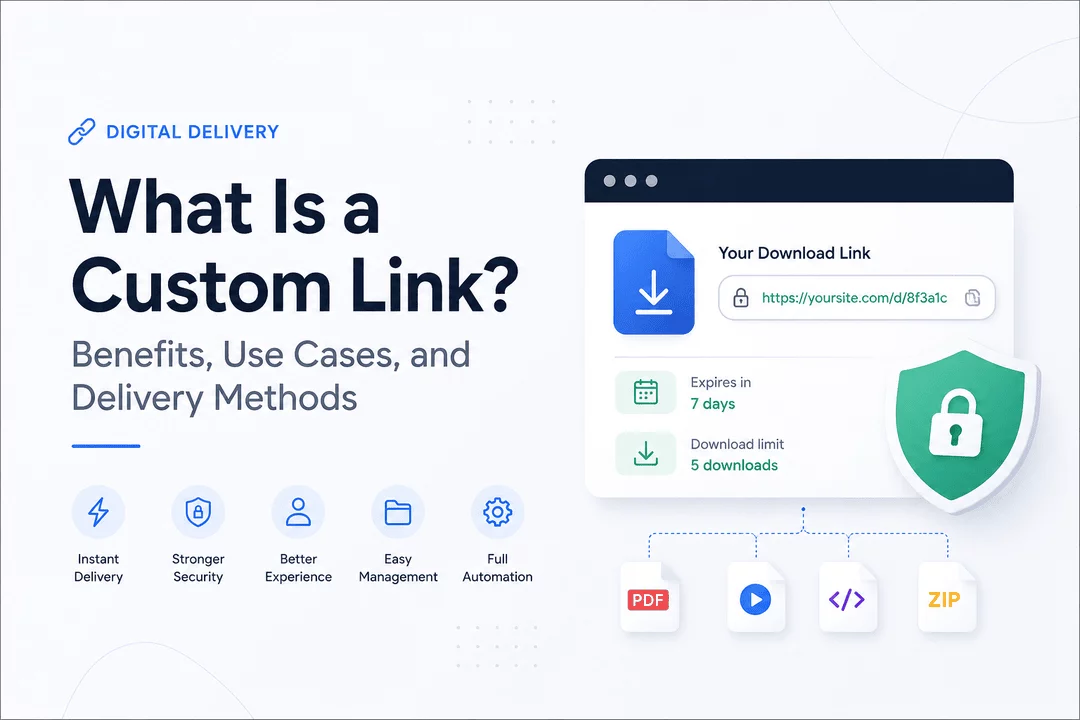
A custom link is a unique URL specifically created to provide access to digital content, downloadable products, private resources, or customer-specific files.
Unlike public URLs that anyone can access, custom links are often:
- Personalized for individual customers
- Generated automatically after purchase
- Protected with expiration rules
- Limited by download count
- Connected to a specific order or account
For digital businesses, custom links make it possible to deliver products instantly and securely without manual work.
For example:
- A customer purchases a software product
- The system automatically creates a private download link
- The customer receives immediate access after checkout
This creates a fast and professional buying experience.
Why Custom Links Are Important for Digital Products
Selling digital products is more than simply uploading files online.
Businesses also need:
- Secure delivery
- Instant customer access
- Download tracking
- Automated fulfillment
- Better organization
- Protection against unauthorized sharing
Custom links solve these challenges by creating a reliable delivery system that works automatically.
Instead of manually sending files through email or messaging apps, businesses can instantly deliver secure access immediately after payment.
Benefits of Using Custom Links
1. Instant Product Delivery
One of the biggest advantages of custom links is speed.
Customers receive their products immediately after checkout, improving the overall buying experience.
Instant delivery helps reduce common support issues such as:
- “Where is my download?”
- “I didn’t receive my file”
- “Can you resend the product?”
Automation saves time for both merchants and customers.
2. Improved Security
Digital products can easily be copied or shared if they are not protected properly.
Custom links help improve security by allowing businesses to:
- Create expiring download URLs
- Limit the number of downloads
- Generate customer-specific links
- Restrict unauthorized access
This is especially useful for:
- Software sales
- Premium templates
- Online courses
- Paid memberships
- Exclusive content
3. Better Customer Experience
A professional delivery experience builds trust.
Customers prefer a clean, automated process instead of waiting for manual emails or support responses.
Custom links create a smoother post-purchase experience and make your business appear more professional.
Satisfied customers are more likely to:
- Purchase again
- Leave positive reviews
- Recommend your products
- Trust your brand
4. Easy Product Management
Custom links also simplify digital product management.
Businesses can:
- Update files without changing links
- Organize customer downloads
- Track delivery history
- Manage multiple files more efficiently
This becomes increasingly important as your digital catalog grows.
5. Full Automation
Manual delivery may work for a few orders, but it quickly becomes difficult as sales increase.
Custom link systems automate:
- File delivery
- Download emails
- Customer access
- License fulfillment
- Product updates
Automation allows businesses to scale without adding extra workload.
Popular Use Cases for Custom Links
Custom links are used across many industries and digital business models.
Software & License Key Delivery
Software companies commonly use custom links to deliver:
- Installation files
- Software updates
- Activation instructions
- License keys
Customers receive secure access immediately after purchase.
eBooks & PDF Products
Authors and creators use custom links to distribute:
- eBooks
- Guides
- Whitepapers
- Worksheets
- Printable resources
This provides a fast and organized customer experience.
Online Courses & Memberships
Course creators often use custom links for:
- Video lesson access
- Private community invitations
- Downloadable course materials
- Premium member content
Custom links help keep paid content secure.
Digital Art & Creative Assets
Designers and creators use custom links to sell:
- Templates
- Presets
- Fonts
- UI kits
- Digital artwork
- Stock assets
Protected links help reduce unauthorized file sharing.
Event Access & Exclusive Releases
Custom links are also useful for:
- Webinar access
- Giveaway rewards
- Private livestreams
- VIP downloads
- Early-access launches
This creates a more exclusive customer experience.
Different Delivery Methods for Custom Links
Businesses can deliver custom links in several ways depending on their workflow and customer experience goals.
1. Email Delivery
The most common method.
After purchase, customers automatically receive an email containing:
- Download links
- Product instructions
- License details
- Access information
This creates a seamless post-purchase workflow.
2. Instant Download Pages
Some stores redirect customers to a download page immediately after checkout.
This provides instant access without requiring customers to check their email.
3. Customer Account Dashboards
Many businesses allow customers to access purchased products directly from their account dashboard.
This is useful for:
- Re-downloads
- Product updates
- Subscription content
- Long-term access management
4. Automated Shopify App Delivery
Modern Shopify apps can automate the entire digital delivery process.
Apps like Digitally help merchants:
- Generate secure custom links
- Deliver files instantly
- Send automated emails
- Manage software license keys
- Track downloads
- Protect digital products
Automation makes digital selling significantly easier and more scalable.
Best Practices for Using Custom Links
To maximize security and improve customer experience, businesses should follow a few important best practices.
Use Secure Download Rules
Protect your products with:
- Expiring links
- Limited download attempts
- Customer-specific access
This helps reduce abuse and unauthorized sharing.
Deliver Products Instantly
Customers expect immediate access after payment.
Fast delivery improves customer satisfaction and reduces support requests.
Include Clear Instructions
Every delivery email or download page should include:
- Download steps
- Installation guides
- Product instructions
- Support contact information
Clear communication creates a better experience.
Track Customer Downloads
Download analytics can help businesses:
- Detect suspicious activity
- Understand customer behavior
- Improve product delivery systems
Tracking provides valuable insights for digital businesses.
How Digitally Simplifies Custom Link Delivery
Managing digital delivery manually can quickly become time-consuming.
Digitally helps Shopify merchants automate and streamline digital product fulfillment.
With Digitally, businesses can:
- Deliver digital products instantly
- Create secure custom links
- Automate download emails
- Manage software license keys
- Protect premium content
- Scale digital product sales more efficiently
Whether you sell software, templates, eBooks, courses, or downloadable files, automation helps create a faster and more professional customer experience.
Final Thoughts
Custom links are one of the most effective ways to securely deliver digital products online.
They help businesses:
- Improve customer experience
- Automate delivery workflows
- Protect digital products
- Save time
- Scale more efficiently
As digital commerce continues to grow, automated delivery systems are becoming essential for creators, developers, and online businesses.
If you want a smoother and more professional digital delivery workflow on Shopify, using a solution like Digitally can help simplify the entire process.
Frequently Asked Questions
A custom link is a unique URL used to deliver digital products, private files, or exclusive content to customers securely and automatically after purchase.
Custom links help businesses automate delivery, improve security, track downloads, and provide customers with instant access to purchased products.
Yes. Many digital delivery systems allow businesses to create expiring links or limit the number of downloads to help protect digital products from unauthorized sharing.
Custom links can be used to deliver software, eBooks, templates, online courses, digital art, PDFs, music files, memberships, and other downloadable products.
Digitally automates the entire digital fulfillment process by generating secure custom links, sending instant download emails, managing license keys, and tracking customer downloads directly on Shopify.
Yes. Digitally allows Shopify merchants to automatically deliver software license keys, installation files, and secure download links immediately after a customer completes their purchase.
custom links
digital product delivery
secure download links
instant file delivery
software delivery Shopify
custom download URLs
digitally

Digitally ‑ Digital Products
Sell files, e-books, license keys, promo codes & digital links
 Install Now