PDF Stamping vs Watermarking: What's the Difference?
Selling PDFs, ebooks, guides, reports, templates, and other downloadable documents online is a convenient way to build a digital product business. However, protecting those files from unauthorized sharing is an important part of digital product delivery.
Two commonly used protection methods are PDF stamping and watermarking. While they may sound similar, they serve different purposes and provide different levels of protection.
For Shopify merchants selling digital products, understanding the difference can help you choose the right approach for protecting your content while keeping the customer experience simple.
What Is PDF Stamping?
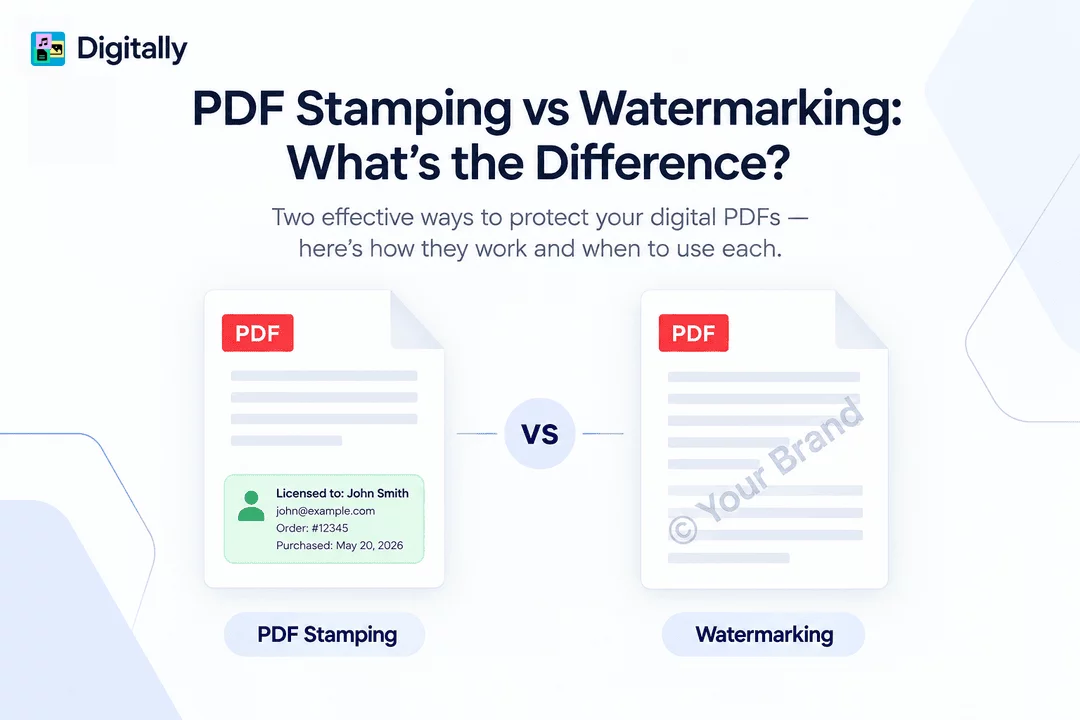
PDF stamping is a document-protection technique that adds unique customer or order information directly to a PDF when the file is delivered.
For example, a purchased ebook might automatically include:
- Customer name
- Customer email address
- Order number
- Purchase date
- Store or brand information
- Other identifying details
The information becomes part of the delivered PDF, creating a personalized copy for each customer.
How PDF Stamping Works
A typical PDF stamping process looks like this:
- A customer purchases a digital PDF from your Shopify store.
- The digital delivery system identifies the order and customer information.
- A unique copy of the PDF is generated.
- Customer-specific information is stamped onto the document.
- The customer receives the personalized file through the configured delivery method.
This means two customers purchasing the same ebook can receive PDFs containing different identifying information.
What Is Watermarking?
Watermarking places a visible or sometimes invisible mark on a document to indicate ownership, branding, or usage restrictions.
A watermark could contain:
- Your company logo
- Brand name
- Copyright notice
- Website address
- "Do Not Distribute" text
- A semi-transparent pattern
For example, a design template could contain your brand logo in the background of every page.
Watermarks are primarily designed to discourage unauthorized use, copying, or redistribution while also reinforcing brand ownership.
PDF Stamping vs. Watermarking: The Key Difference
The main difference is personalization versus branding/protection.
PDF stamping generally identifies the individual customer or transaction. Watermarking generally identifies the content owner or communicates usage restrictions.
Feature | PDF Stamping | Watermarking |
Main purpose | Identify the purchaser | Protect or brand the document |
Customer-specific information | Yes | Optional |
Customer name/email | Common | Not usually |
Logo and branding | Optional | Common |
Helps discourage sharing | Strong | Moderate to strong |
Personalized for every buyer | Yes | Usually no |
Useful for copyright visibility | Yes | Yes |
Ideal for digital product sellers | Yes | Yes |
In practice, these methods can also be used together.
Why PDF Stamping Can Help Reduce Unauthorized Sharing
Digital files are easy to copy and distribute. Once a customer downloads an unprotected PDF, it can potentially be uploaded to file-sharing websites, private groups, forums, or other platforms.
PDF stamping adds accountability.
Imagine a customer receives an ebook containing their name and email address on every page. If that file appears publicly online, the identifying information can make the original purchaser easier to identify.
This doesn't make unauthorized sharing impossible, but it can create a strong psychological deterrent.
Example
Suppose you sell a $49 industry research report.
Without personalization, every buyer receives the exact same file:
Industry Research Report 2026.pdf
With PDF stamping, each customer could receive a personalized version:
Industry Research Report 2026
Licensed to: Customer Name
Email: customer@example.com
Order: #12345
The second approach makes casual redistribution less attractive.
Why Watermarks Are Useful
Watermarks are especially useful when branding and ownership visibility are important.
For example, a photographer selling a digital portfolio could add a subtle logo to every page. An educational business could add its brand name and copyright notice to downloadable course materials.
Watermarks can help:
- Establish ownership
- Increase brand visibility
- Discourage unauthorized use
- Communicate copyright restrictions
- Make copied documents easier to identify
- Protect preview or sample documents
However, a generic watermark does not necessarily tell you which customer originally received the file.
PDF Stamping and Watermarking Can Work Together
You don't necessarily have to choose one method.
For many digital product businesses, combining them provides broader protection.
For example, a PDF could include:
Brand watermark:
"© Your Store — All Rights Reserved"
Customer stamp:
"Licensed to: John Smith — john@example.com"
This combination provides both brand protection and customer-level traceability.
The watermark establishes ownership, while the stamp helps connect a specific copy to its purchaser.
PDF Stamping vs. Watermarking for Shopify Digital Products
Shopify merchants selling digital products have several reasons to consider document protection.
Digital products can include:
- Ebooks
- PDF guides
- Online courses
- Research reports
- Workbooks
- Templates
- Design resources
- Educational materials
- Business documents
- Premium reports
If every customer receives the same unrestricted PDF, unauthorized redistribution can be difficult to trace.
A personalized delivery process can make digital products more secure without requiring customers to complete additional steps.
With an app such as Digitally, Shopify merchants can use digital delivery features to manage downloadable products and apply PDF protection as part of their fulfillment workflow.
When Should You Use PDF Stamping?
PDF stamping is particularly useful when your primary concern is customer-level accountability.
Consider using it when:
- You sell premium ebooks or reports.
- Your PDFs contain proprietary information.
- Customers receive licensed educational materials.
- You want to discourage customers from sharing files.
- You want each purchase associated with a specific buyer.
- Your digital products have significant commercial value.
The more valuable and shareable the content is, the more useful personalization can become.
When Should You Use Watermarking?
Watermarking is a strong choice when your main goal is branding and visible ownership.
It can be useful for:
- Photography portfolios
- Design templates
- Creative resources
- Preview documents
- Educational materials
- Branded reports
- Copyrighted content
Watermarking can also be useful for free downloads where you want readers to remember where the document came from.
Which One Is Better?
There isn't a universal winner because PDF stamping and watermarking solve slightly different problems.
Choose PDF stamping when you want to associate a document with a particular customer or transaction.
Choose watermarking when you want to emphasize ownership, branding, or copyright.
Choose both when you want a stronger overall protection strategy.
For merchants selling paid digital products, combining personalized PDF stamping with other security measures can provide a more comprehensive approach.
Other Ways to Protect Digital PDFs
PDF protection shouldn't depend on a single feature. You can combine stamping or watermarking with additional security controls.
1. Limit Downloads
Set reasonable download limits so customers cannot repeatedly generate or download unlimited copies.
2. Use Expiring Download Links
Time-limited links can reduce the risk of customers sharing a permanent download URL.
3. Protect Your Original Files
Keep master copies of your PDFs in a secure storage environment rather than exposing the original file URL.
4. Automate Digital Delivery
Automated delivery ensures customers receive the correct protected file immediately after purchase without requiring manual fulfillment.
5. Monitor Suspicious Activity
Unusual download patterns, repeated requests, or excessive downloads can indicate potential misuse.
6. Provide Clear Usage Terms
Explain whether customers can print, share, modify, or redistribute the purchased content.
Technology works best when combined with clear customer expectations.
Best Practices for PDF Protection
When implementing PDF protection for your Shopify store, keep the customer experience in mind.
Make the Stamp Professional
Avoid covering important content. The stamp should be visible enough to discourage sharing without making the document difficult to read.
Keep Personal Information Appropriate
Only include information that is necessary for identification. Avoid exposing sensitive customer information unnecessarily.
Protect Every Page When Appropriate
For high-value documents, placing identifying information on multiple pages can make removing it more difficult.
Explain the Protection
Let customers know that their download is personalized. Transparency can make the protection feel like a security feature rather than an inconvenience.
Combine Multiple Security Measures
PDF stamping, watermarks, download limits, and expiring links can work together to create a stronger digital delivery system.
Final Thoughts
PDF stamping and watermarking are related but different approaches to digital document protection.
PDF stamping focuses on personalization and traceability, making it possible to associate a specific copy with its purchaser. Watermarking focuses more on branding, ownership, and discouraging unauthorized use.
For Shopify merchants selling digital products, the right approach depends on what you're trying to protect and how customers use your content.
If you sell valuable PDFs, ebooks, reports, or other downloadable products, combining personalized PDF stamping with secure digital delivery can provide an effective way to discourage unauthorized sharing while keeping fulfillment automated.
With Digitally, Shopify merchants can manage digital product delivery and use PDF protection features as part of a streamlined digital fulfillment workflow.
Frequently Asked Questions
PDF stamping adds personalized information such as a customer's name, email, or order number to a PDF. Watermarking typically adds branding, copyright information, or visual ownership indicators to protect and identify the content.
PDF stamping cannot completely prevent file sharing, but it can discourage unauthorized redistribution by associating a specific copy with the purchaser. Download limits and expiring links can provide additional protection.
Watermarking can discourage unauthorized use and establish ownership, but it should not be considered complete digital protection. Combining watermarks with personalized stamping, secure download links, and download restrictions can provide stronger protection.
Yes. Digitally can be used to automate digital product fulfillment and PDF protection, allowing Shopify merchants to deliver protected digital files without manually processing every order.
PDF stamping is useful when you want each ebook copy associated with a specific customer. Watermarking is useful for branding and copyright visibility. For valuable ebooks, using both can provide additional protection.
Digitally helps Shopify merchants securely deliver digital products such as PDFs, ebooks, files, license keys, and other downloadable content. Its digital delivery and protection features can help reduce unauthorized sharing while keeping fulfillment automated.
PDF Stamping
PDF Watermarking
Digital Product Protection
Digitally
Digital Downloads
Secure File Delivery
Digital Downloads Shopify

Digitally ‑ Digital Products
Sell files, e-books, license keys, promo codes & digital links
 Install Now