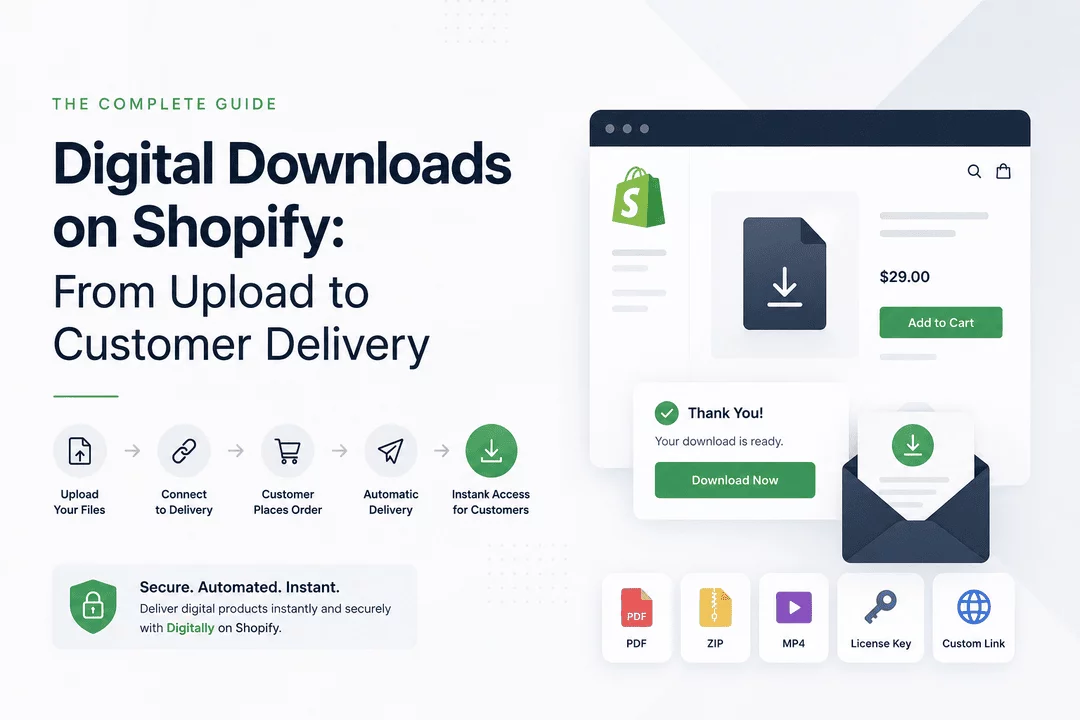
Digital Downloads on Shopify: From Upload to Customer Delivery
Selling digital products has become one of the most profitable business models for online merchants. Unlike physical products, digital downloads don't require inventory, shipping, or warehouse management. Whether you're selling ebooks, software, templates, music, online courses, or design assets, Shopify provides an excellent platform to build your store.
However, creating a great customer experience involves much more than uploading a file. Customers expect instant access immediately after payment, while merchants need secure delivery that protects valuable digital assets.
This guide walks you through the complete journey of selling digital downloads on Shopify—from uploading your products to delivering them automatically after purchase.
Why Sell Digital Downloads on Shopify?
Digital products offer several advantages over physical goods.
Some of the biggest benefits include:
- No manufacturing costs
- No inventory management
- Instant worldwide delivery
- High profit margins
- Easy scalability
- Passive income opportunities
- No shipping or fulfillment delays
As your business grows, automation becomes essential. Manual emailing quickly becomes impossible when handling hundreds or thousands of orders.
What Counts as a Digital Download?
Almost any downloadable digital asset can be sold through Shopify.
Common examples include:
- eBooks
- PDF guides
- Online courses
- Software installers
- License keys
- Digital art
- Photography presets
- Music files
- Video tutorials
- Printable planners
- Fonts
- Website templates
- Graphic design assets
- Coding resources
- Gaming activation codes
Each product can be delivered automatically after checkout.
Step 1: Create Your Digital Product
Before customers can purchase your product, you'll first create it inside Shopify.
Typical product information includes:
- Product title
- Description
- Images
- Pricing
- Product category
- Digital download attachment
Unlike physical products, shipping is not required.
A well-written product page improves both SEO and conversion rates.
Step 2: Upload Your Digital Files
Once your product is ready, upload the digital file you'll deliver.
Examples include:
- ZIP archives
- PDF documents
- MP4 videos
- Software installers
- PSD files
- AI files
- EPUB books
- Audio files
Depending on your delivery app, you may also upload:
- License keys
- Subscription codes
- QR codes
- Custom links
- Cloud-hosted resources
Organizing files properly makes future updates much easier.
Step 3: Connect the Product to Delivery
Uploading files alone isn't enough.
Customers need a secure way to receive them after payment.
A digital delivery solution connects your Shopify product to downloadable assets.
Once connected, the entire fulfillment process becomes automatic.
Step 4: Customer Places an Order
The customer browses your store, adds the digital product to their cart, and completes checkout.
From the customer's perspective, everything feels identical to buying a physical product.
The difference happens behind the scenes.
Immediately after payment confirmation, the delivery process begins automatically.
Step 5: Automatic Delivery
Instead of waiting for manual emails, customers instantly receive their purchase.
Delivery methods commonly include:
- Download email
- Thank You page
- Customer account page
- Secure download links
- License key display
- QR code delivery
- Custom access links
Instant fulfillment creates a much better buying experience.
Why Instant Delivery Matters
Customers purchasing digital products expect immediate access.
Even a delay of a few hours can result in:
- Refund requests
- Support tickets
- Negative reviews
- Lost trust
- Lower repeat purchases
Automation removes these problems entirely.
Protect Your Digital Products
Selling digital products also requires protecting them.
Without security measures, files can easily be shared publicly.
Best practices include:
Download Limits
Restrict the number of downloads allowed.
Expiring Download Links
Generate links that automatically expire after a certain period.
PDF Stamping
Add customer information to purchased PDFs to discourage unauthorized sharing.
Secure File Hosting
Avoid exposing public file URLs that anyone can access.
License Key Management
Deliver unique activation keys instead of sending the same code to every customer.
Common Delivery Methods
Different digital products require different delivery methods.
Product Type | Best Delivery Method |
eBooks | PDF Download |
Software | Installer + License Key |
Online Courses | Custom Login Link |
Memberships | Subscription Key |
Digital Art | ZIP Download |
Music | MP3 Download |
Templates | ZIP File |
SaaS Access | License Key + Dashboard Link |
Offering the right delivery method improves customer satisfaction.
Why Automation Is Essential
Manual fulfillment may work for your first few sales.
But eventually you'll encounter problems like:
- Forgetting to send files
- Sending incorrect products
- Delayed responses
- Duplicate emails
- Customer complaints
Automation solves all of these challenges.
It allows you to scale from ten orders per month to thousands without increasing workload.
How Digitally Simplifies Digital Delivery
Managing digital products becomes much easier with Digitally.
Instead of manually fulfilling orders, Digitally automates the entire process from purchase to delivery.
Key features include:
- Instant digital downloads
- Secure file delivery
- License key automation
- Subscription key delivery
- Custom links
- QR code delivery
- Download limits
- Expiring links
- PDF stamping
- Large file support
- Bulk license key management
- Custom email templates
- Thank You page delivery
- Customer account downloads
Whether you sell software, ebooks, memberships, or digital assets, Digitally helps create a smooth buying experience while protecting your products.
Best Practices for Selling Digital Downloads
Follow these tips for better results:
- Write detailed product descriptions.
- Use high-quality product images.
- Deliver products instantly.
- Protect download links.
- Keep files updated.
- Organize license keys carefully.
- Test the customer purchasing experience.
- Use branded delivery emails.
- Monitor download activity.
- Provide responsive customer support.
Small improvements can significantly increase customer satisfaction.
Conclusion
Selling digital downloads on Shopify is one of the most efficient ways to build a scalable online business. From uploading your files to delivering them automatically after checkout, every step of the customer journey matters.
By combining Shopify with a reliable delivery solution like Digitally, you can automate fulfillment, secure your digital products, reduce support requests, and provide customers with the instant access they expect. Whether you're selling ebooks, software licenses, online courses, templates, or other downloadable products, a streamlined delivery process helps your business grow while creating a better customer experience.
Frequently Asked Questions
Create a digital product in Shopify, upload your downloadable files using a digital delivery app, and configure automatic fulfillment so customers receive their purchases immediately after payment.
You can sell ebooks, PDFs, software, license keys, online courses, music, videos, templates, fonts, printables, digital artwork, subscriptions, and more.
A digital delivery app sends secure download links, license keys, custom links, or QR codes through email, the Thank You page, or the customer's account immediately after checkout.
Use expiring download links, download limits, PDF stamping, secure file hosting, and unique license keys to reduce unauthorized distribution.
Yes. Digitally supports file downloads, license keys, subscription codes, QR codes, and custom links, making it suitable for many types of digital products.
Digitally automates digital product fulfillment, secures downloads with features like PDF stamping and expiring links, supports large files, and provides multiple delivery methods to improve both merchant efficiency and customer satisfaction.
Digital Downloads on Shopify
Sell digital products on Shopify
Digital product delivery
Automated file delivery
Shopify download links
Digitally
license keys

Digitally ‑ Digital Products
Sell files, e-books, license keys, promo codes & digital links
 Install Now