What Is PDF Stamping and Why Is It Important for Digital Product Security?
Selling digital products has become one of the fastest-growing ecommerce business models. Whether you sell ebooks, reports, worksheets, templates, educational materials, or premium documents, one challenge remains the same: protecting your PDFs from unauthorized sharing.
Once a customer downloads a PDF, it can easily be copied and distributed to others. This can lead to lost revenue, copyright violations, and unauthorized access to your premium content.
One of the most effective ways to reduce this risk is PDF stamping.
In this guide, you'll learn what PDF stamping is, how it works, why it's important, and how Shopify merchants can use Digitally – Digital Products to automatically secure PDF downloads.
What Is PDF Stamping?
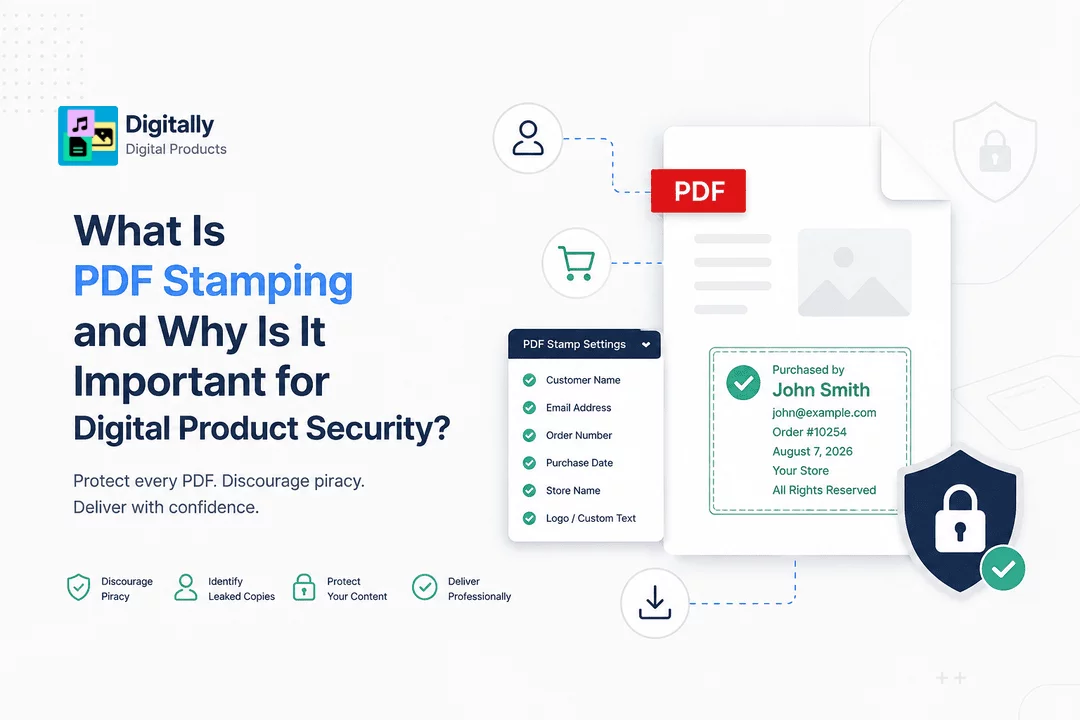
PDF stamping is the process of automatically adding customer-specific information to every PDF that is downloaded.
Instead of sending the exact same file to every buyer, the system creates a personalized version containing information such as:
- Customer name
- Email address
- Order number
- Purchase date
- Store name
- Custom text
- Company logo
- Copyright notice
Each customer receives a uniquely stamped PDF.
This personalization discourages unauthorized sharing because every copy can be traced back to the original purchaser.
How Does PDF Stamping Work?
The process is completely automatic.
Step 1: Upload Your PDF
Upload your ebook, guide, manual, worksheet, or document.
Step 2: Configure Stamp Settings
Choose what information should appear on every downloaded PDF.
Examples include:
- Purchased by John Smith
- john@example.com
- Order #10254
- Purchased on August 7, 2026
Step 3: Customer Makes a Purchase
After checkout, your Shopify store sends the order information.
Step 4: Personalized PDF Is Generated
The app inserts the customer details into the PDF before delivery.
Step 5: Secure Download
The customer receives a personalized PDF instead of the original master file.
Why Is PDF Stamping Important?
Without protection, a single buyer can upload your ebook to forums, social media, or file-sharing websites.
PDF stamping significantly reduces this behavior because every document identifies its purchaser.
Benefits include:
- Discourages piracy
- Reduces unauthorized sharing
- Protects intellectual property
- Helps identify leaked copies
- Increases customer accountability
- Protects premium educational content
- Adds professionalism to digital delivery
What Can Be Added to a PDF Stamp?
Most PDF stamping solutions allow you to include:
- Customer name
- Customer email
- Order ID
- Purchase date
- Company logo
- Store name
- Copyright message
- License information
- Custom text
- QR codes (if supported)
You can place the stamp in headers, footers, corners, or as a subtle watermark across the page.
PDF Stamping vs Watermarking
Although people often use these terms interchangeably, they are different.
PDF Stamping | Watermarking |
Personalized for each customer | Same watermark for everyone |
Includes buyer information | Usually only a logo or text |
Helps identify leaked copies | Mainly used for branding |
Better for digital product protection | Better for branding documents |
For ecommerce stores, personalized PDF stamping offers much stronger protection than generic watermarks.
Benefits for Shopify Merchants
Shopify stores selling digital products often face unauthorized sharing.
PDF stamping helps merchants:
Protect Revenue
Reduce the likelihood of customers distributing purchased files.
Improve Brand Trust
Professional document delivery increases customer confidence.
Reduce Piracy
Every downloaded file is uniquely personalized.
Automate Security
No manual editing is required.
Scale Easily
Whether you sell 10 PDFs or 100,000, every file can be stamped automatically.
How Digitally Helps Protect PDF Downloads
Digitally – Digital Products makes secure PDF delivery simple for Shopify merchants.
With Digitally, you can:
- Automatically stamp PDFs with customer information
- Deliver secure downloads instantly after purchase
- Set download limits
- Create expiring download links
- Protect premium digital content
- Sell ebooks, guides, manuals, templates, and educational resources securely
- Manage all digital products from one dashboard
- Automate digital product fulfillment without manual work
This helps reduce unauthorized sharing while providing a seamless customer experience.
Best Practices for PDF Security
To maximize protection for your digital products:
- Use personalized PDF stamping for every purchase.
- Limit the number of downloads.
- Enable expiring download links.
- Include copyright notices in your documents.
- Monitor unusual download activity.
- Combine PDF stamping with secure digital delivery.
- Keep your original master files private.
Using multiple security layers provides much stronger protection than relying on a single method.
Common Myths About PDF Stamping
"It completely stops piracy."
No security method can eliminate piracy entirely, but PDF stamping significantly discourages unauthorized sharing by making each copy traceable.
"It changes my original PDF."
No. Your original file remains unchanged. A personalized copy is generated for each customer.
"It's only useful for ebooks."
Not at all. PDF stamping works for any downloadable PDF, including manuals, templates, reports, worksheets, and educational content.
"Customers notice large watermarks."
Not necessarily. Stamps can be subtle and placed discreetly while still providing effective identification.
Conclusion
PDF stamping is one of the most effective ways to protect downloadable PDFs without creating friction for legitimate customers.
By personalizing every purchased document with customer information, merchants can discourage unauthorized sharing, safeguard intellectual property, and deliver a more professional digital product experience.
If you sell ebooks, guides, templates, reports, or any other PDF-based products on Shopify, combining PDF stamping with secure delivery features like download limits and expiring links can greatly improve your digital product security. Digitally – Digital Products makes it easy to automate these protections so you can focus on creating great content while your store handles secure delivery.
Frequently Asked Questions
PDF stamping is the process of automatically adding customer-specific information—such as their name, email address, order number, or purchase date—to a PDF before it is delivered. This helps discourage unauthorized sharing and improves document traceability.
Yes. A standard watermark is identical for every customer, while PDF stamping creates a personalized copy for each buyer, making it far more effective for protecting digital products.
Yes. Apps like Digitally – Digital Products can automatically apply PDF stamps after a customer completes their purchase, allowing Shopify merchants to deliver personalized and secure PDF downloads without manual work.
No. PDF stamping only adds selected text or graphics to the document. The original content, formatting, and print quality remain unchanged.
Yes. Digitally – Digital Products allows Shopify merchants to secure PDF downloads with automatic PDF stamping, download limits, and expiring download links, helping protect ebooks, guides, templates, and other digital products from unauthorized sharing.
Absolutely. In addition to secure PDF delivery, Digitally – Digital Products supports files, license keys, activation codes, custom download links, QR codes, and other digital products, making it a complete digital delivery solution for Shopify merchants.
PDF Stamping
Digital product security
PDF watermarking
PDF protection
Digitally
Protect PDF downloads

Digitally ‑ Digital Products
Sell files, e-books, license keys, promo codes & digital links
 Install Now